


Plant Identifier & Plant Care
4.3212.00 Reviews
App Specs
- Version
- 2.5.0
- Updated On
- License
- Free
- Downloads
- 500,000+
- Developer
- Watermark Remover & Slow motion & SlowMo
- Categories
- Education
- Platform
- Android
Screenshots
 Analysis by AppCompare
When I use a plant-identification app, I’m trusting it with more than a quick name lookup: a photo can show what grows around my home, what I’m trying to treat, or what I’m considering bringing indoors. That makes Plant Identifier & Plant Care most useful when I treat it as a practical guide rather than an unquestionable authority. Its appeal is the combination of identifying plants and offering care guidance, but I still look at the result carefully and use my own judgment before acting on it.
What I look for before trusting an answer
A photo-based identification is a starting point, not a botanical guarantee. Leaves can look alike across different species, and lighting, a cluttered background, a young plant, or visible damage can all make a picture harder to interpret. When I’m uncertain, I take another close, well-lit photo of a healthy leaf and, if possible, include a wider view that shows the plant’s shape. Comparing those views is more useful than accepting the first label simply because it sounds precise.
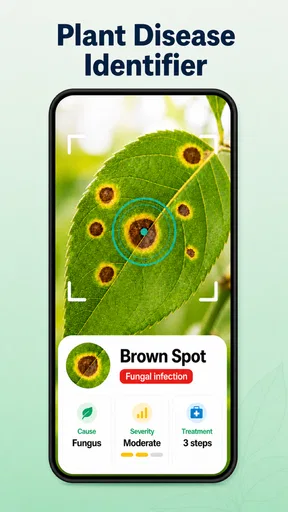
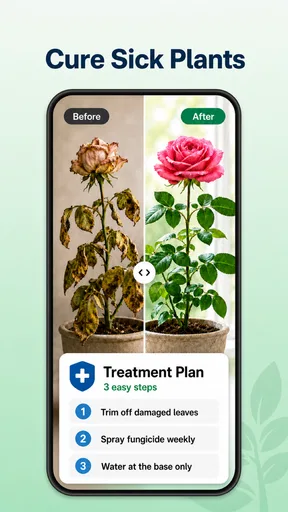
The same caution matters when the app offers a diagnosis. A yellow leaf, for example, might reflect watering, light, soil, or normal aging; a photo alone may not settle which explanation fits. I use a diagnosis as a prompt to inspect the plant and its surroundings, not as a reason to make several changes at once. If a problem is spreading quickly or the plant is valuable, advice from a local nursery or an experienced grower can be a better next step.
Practical choices for photos and care
For a useful scan, I try to keep the plant in focus, avoid harsh shadows, and frame the part I want identified rather than a whole crowded bed. For a suspected disease, I photograph the affected area and a healthy section separately. That gives me a clearer record of what I observed, even if I later seek help elsewhere. I also avoid including people, addresses, or other details in the background when they are not needed for the plant question.
Care advice is easiest to use when I turn it into a small, observable routine. Rather than changing watering, light, and soil together, I make one adjustment and watch how the plant responds. A reminder can help me remember to check a pot, but I wouldn’t water automatically just because a notification appears: soil moisture and the plant’s condition should guide that decision. This is especially helpful for beginners who mistake consistency for giving every plant the same schedule.
Choices, costs, and fit
The app is free to install, and its in-app purchases range from $8.99 to $89.99 per item, so I’d check the purchase screen carefully before committing to anything. The developer is listed as Watermark Remover & Slow motion & SlowMo. It has a 4.5 average from around 1.7 thousand ratings, with over 100 thousand installs; those figures suggest that plenty of people have tried it, but they don’t tell me whether a particular identification will be right for my plant.
It is an Education app rated for Everyone, released on September 4, 2024, and its current version is 2.4.6, with Android 8.0 as the minimum operating-system requirement. Those details help me judge basic compatibility and audience, but they don’t replace reading the choices shown inside the app. Before granting access or purchasing an option, I look at the permission prompt and the wording on the screen, and I decide whether that access makes sense for the task I’m doing.
Worth Reading Before You Choose

EA SPORTS FC Mobile 26 Is a Bigger Football Game, but It Takes Time

Flipboard Shows What News Apps Must Do Beyond the Feed

Switching to Android Auto Means Rethinking Your Driving Routine

Google Calendar Makes a Crowded Week Easier to Manage

Ludo King Makes the Most of the Minutes Between Plans

Baby Panda World Brings Quick Play to Modern Phones, but Its Game Library Feels Busy
Getting to Know Your Green Friends
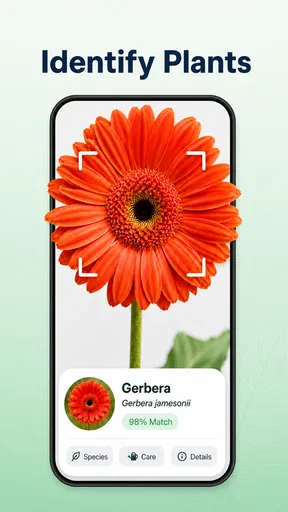
So, here's how it works: you simply take a picture of the plant you want to identify. The app's AI does its magic, and voilà – you're presented with details about your plant buddy. It's pretty nifty! The accuracy is impressive, often giving you the common name, scientific name, and some interesting tidbits about the plant's origin and uses.
Care Tips Like a Pro
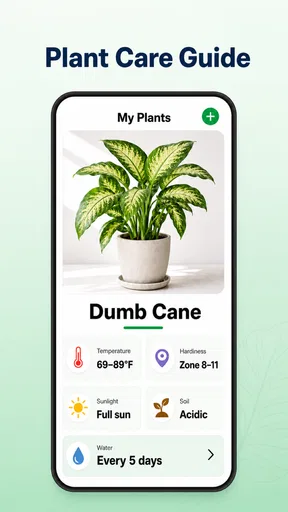
But wait, there's more! The Plant Identifier & Plant Care app isn't just about identifying plants. It also offers handy care tips, which is a lifesaver for someone like me who tends to love plants a little too much (read: overwatering). The app provides advice on watering schedules, sunlight needs, and even soil preferences. It's like having a personal plant consultant, minus the hefty fee.
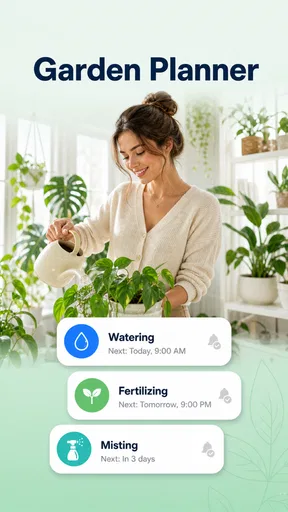
One of the coolest features has to be the reminders. You can set notifications for watering and fertilizing, ensuring that you never forget to give your green friends the TLC they deserve. It's like having a plant nanny, and who wouldn't want that?
Design and Usability
When it comes to user interface, the app scores high in my books. It's intuitive and easy to navigate, which is a big plus for those of us who aren't exactly tech-savvy. The layout is clean, with vibrant images that make plant identification not just informative but also a visual treat.
There's an option to save your identified plants in a personal library, which is great for tracking your plant collection. You can even add notes, making it easier to remember specific care instructions or any changes you've noticed in your plants over time.
Community and Connectivity
One feature I love is the community aspect. There's a section where you can connect with other plant enthusiasts, share your experiences, and even get advice. It's like a mini social network for plant lovers. Plus, the app occasionally hosts challenges and events that encourage you to explore more plants and share your findings.
Sharing your plant discoveries is a breeze. The app allows you to post directly to social media, making it easy to show off your plant knowledge or seek advice from friends. It's a fun way to engage with the community and get more out of the app.
Using it in an ordinary plant-care routine
A realistic use for me is the quick check I do when a new plant comes home. I photograph it before moving it to a permanent spot, compare the identification with the label from the shop, and save the result if it seems to match. Then I note where I placed it and what I observe over the next few days. That gives me a useful baseline instead of relying on memory when a leaf later changes color.
The library and notes are more valuable as a record than as a substitute for observation. I’d note a change in position, a new growth, or when I last checked the soil, then use that history to see whether the plant is responding. One small but useful habit is to photograph from roughly the same angle when tracking a suspected problem. The comparison can make gradual changes easier to notice than a series of unrelated snapshots.
For an unfamiliar plant outdoors, I’d use the identification to narrow down what I’m looking at, then verify anything that affects safety or removal decisions through a dependable local source. I wouldn’t eat a wild plant, handle a potentially irritating species, or use a treatment on a garden based only on an automated result. That distinction keeps the app in its strongest role: helping me become curious and better informed, rather than making a risky decision for me.
Where it fits among the alternatives
Compared with searching the web manually, a camera-first tool is quicker when I have a clear plant photo but no name to search. A general image search can show lookalikes, yet it often leaves me to sort through results and piece together care advice. This app brings identification and plant-care information into one experience, which is convenient for a beginner who wants a simple next step after taking a picture.
A specialist gardening guide or a knowledgeable local grower may be a better choice when the question depends on regional conditions, a complicated disease, or precise treatment decisions. Those alternatives can bring context that a single image cannot capture. I also wouldn’t choose this app as my main tool if I want a detailed gardening journal with custom measurements and long-term planning; its plant library and notes are helpful for lightweight tracking, but serious record-keeping may call for a dedicated system.
The app is a good fit for curious beginners, houseplant owners who want a nudge to learn names and care preferences, and gardeners who often encounter plants they can’t identify. It is less suitable for someone who needs guaranteed species identification, professional diagnosis, or a fully customized horticulture plan. I find it most rewarding when I’m willing to check the result, observe the plant, and treat care suggestions as guidance to adapt—not fixed rules that apply to every pot.
Making the most of reminders and saved plants
Reminders work best as prompts to inspect rather than commands to perform a task. If the alert says it is time to water, I first check the soil and consider the plant’s location and recent conditions. A pot in a bright, warm spot may dry differently from one in a cooler corner, even if both are the same kind of plant. This simple pause prevents a schedule from reinforcing the very overwatering habit the feature is meant to help manage.
I’d also keep notes specific enough to be useful later: “moved away from the window” tells me more than “changed care.” If I’m testing a new spot or watering approach, I record that change and avoid making several others at once. It’s a low-effort way to learn what works in my home, where indoor conditions may differ from the general advice in an app. The trade-off is that the library is only useful if I actually maintain it; a neglected collection quickly becomes a list of names without practical context.
Permissions, privacy, and control in practice
Because identification relies on images, I pay attention to the moment I choose or capture a photo. I frame the plant tightly and review what is visible before sharing anything. When an app asks for access, I read the prompt and grant only what I’m comfortable with for the action I want to take. I don’t assume that a particular permission is necessary or unnecessary without seeing the request in context.
I also distinguish between keeping a plant record for myself and posting a discovery socially. Those are different choices: a saved note can help with care, while a public post may reveal more than the plant itself if the image contains personal surroundings. I’d use the sharing option selectively and check the image first. This is a sensible habit with any photo-based app, especially when the subject is near a doorway, window, or other recognizable part of home.
Before buying an in-app option, I’d read the purchase screen rather than infer what is included from the free experience. The listed purchase range is broad, so it makes sense to confirm the specific item and terms shown at checkout. If I only need occasional identifications and basic care pointers, I’d start with the free app and decide later whether an offered upgrade solves a real problem for me. That keeps the decision tied to my use, not to a vague promise of more features.
Final Thoughts
All in all, the Plant Identifier & Plant Care app is a fantastic tool for anyone looking to enhance their plant knowledge and care skills. Whether you're a seasoned gardener or a newbie plant parent, this app offers something valuable. It's educational, user-friendly, and just plain fun.
If you're curious about the green world around you or just want to keep your home jungle thriving, give this app a try. It's like having a personal garden guru available at your fingertips, and honestly, who wouldn't want that?
My cautious verdict is that I’d use it as a convenient companion for learning and everyday plant checks, not as the final word on a difficult diagnosis. Its photo identification, care suggestions, reminders, and saved notes make a practical combination, particularly if I’m building confidence as a plant owner. I’d skip it if I needed expert certainty or wanted to make high-stakes decisions from a scan alone; for ordinary curiosity and a more organized care routine, it’s an approachable place to start.
Pros
- Easy-to-use interface for all users.
- Accurate plant identification feature.
- Comprehensive plant care tips.
- Offline mode availability.
- Wide database of plant species.
Cons
- Limited free version features.
- In-app ads can be distracting.
- Requires internet for updates.
- Subscription needed for full access.
- UI can be slow on older devices.
FAQs for Plant Identifier & Plant Care
What features does the Plant Identifier & Plant Care app offer?
The app offers a comprehensive plant identification feature using a photo-based AI system. It also provides detailed plant care guides, personalized watering schedules, and reminders. Additionally, users can access a database of thousands of plants, which includes information on optimal growing conditions, pest management, and fertilization tips.
How accurate is the plant identification feature?
The plant identification feature is highly accurate, thanks to its advanced AI technology, which analyzes images to match them with a vast database of plant species. While it boasts a high success rate, accuracy can sometimes vary based on image quality and clarity. Regular updates help improve the identification process.
Is the app suitable for both beginners and experienced gardeners?
Yes, the app is designed to cater to both beginners and experienced gardeners. It offers simple, step-by-step care guides for newcomers while providing detailed, advanced information for seasoned plant enthusiasts. The customizable reminders and expert tips make it a versatile tool for all gardening levels.
Does the app require an internet connection for its features?
While the plant identification feature requires an internet connection to access the extensive database, many other features, such as reminders and care guides, can be accessed offline once downloaded. This makes it convenient for users who might not always have internet access while gardening.
Are there any in-app purchases or subscription fees?
The app offers a free version with basic features, but to access premium features like advanced care guides, ad-free experience, and more frequent updates, users can opt for a subscription. There are various subscription plans available, including monthly and yearly options, to suit different needs and budgets.


